Conventional commits cheatsheet (and a 5-minute setup)
I’ve been writing conventional commits for years. It’s obviously better than ‘fixed stuff’ or ‘wip’ or ‘final final v2’ but it’s also better than writing ‘removed this section’. I’ll show you exactly why. And I’ll get you addicted to conventional commits.
The official spec is 11 rules and reads like an RFC. I’ve made it easier to read, and give you a free 5-minute setup so you can use it like a champ.
tldr
The format is:
<type>(<scope>): <short description>Common rules/ cheatsheet:
| Type | When | Example |
|---|---|---|
feat | New feature | feat: add user login |
fix | Bug fix | fix: typo |
docs | Docs only | docs: update API reference |
style | Formatting, no logic change | style: fix indentation |
refactor | Restructure, same behavior | refactor: extract payment logic |
perf | Performance | perf: cache db queries |
chore | Build, deps, tooling | chore: bump vite to 5 |
Three rules only: lowercase, no period at the end, scope is optional.
feat(auth): add password reset flow
fix: prevent double submit on checkout
docs: add migration guide
Cool. Let’s talk about why you need it.
Why bother?
Three reasons.
- If you have commits like
featandfix, you can auto-update versions, auto-generate changelogs and more. It’s for machines; you can automate stuff if a commit fits a category. - Humans can tell what it’s about. Easier to read, easier to review.
refactorandperfare very different things. Also makes you think what you need your commit to be. Why? When you’re new, you want to do everything in one commit - you add 10 components, fix a bug, fix a typo, update docs, refactor something - and call it ‘did many things’. Works. But it’s not a good practice. Way better to break every task into a commit. Conventional commits helps you avoid scope creep. - Easy to maintain. New devs will thank you. Future you will thank you.
I stick to conventional commits for all my projects. I use it for my SaaS, my personal site, my blogs, everything. It keeps me sane. If your project is small and you don’t care about automated releases, it’s fine to skip it.
A HN thread from June 2026 was arguing that a commit should be insightful, not categorized. Fair. But “insightful” is hard to standardize and easy to skip; fix: null check in contact form is cheap.
Make it automatic
I know the exact terms (feat, docs) because I’ve used it for years. You need two tools to do the same.
1: Commitizen (or a VS Code extension)
Commitizen asks you for the type, scope, and description instead of git commit -m:
npm install -D commitizen cz-conventional-changelog
npx commitizen init cz-conventional-changelog -- --yarn --dev --exact
Then commit with:
npx git-czIt asks you:
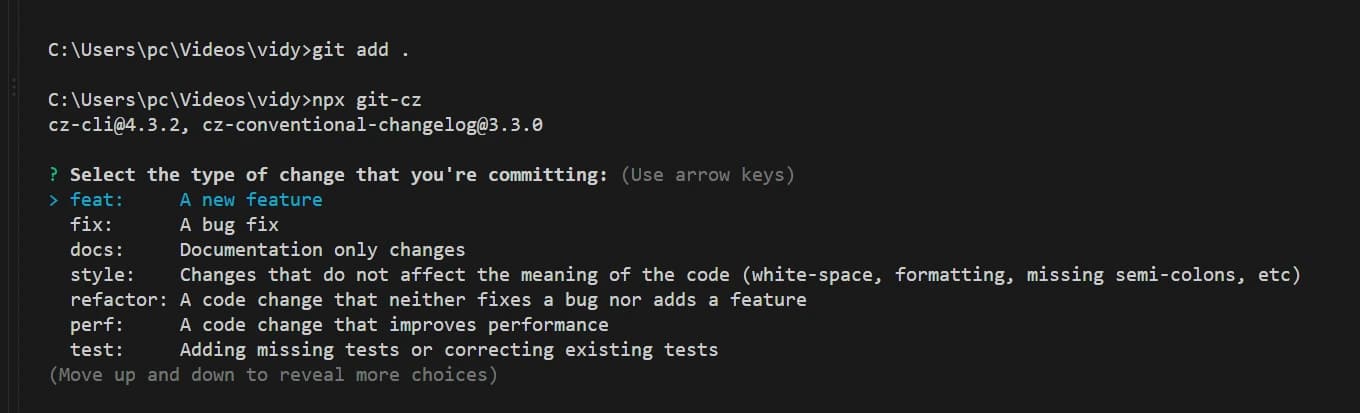
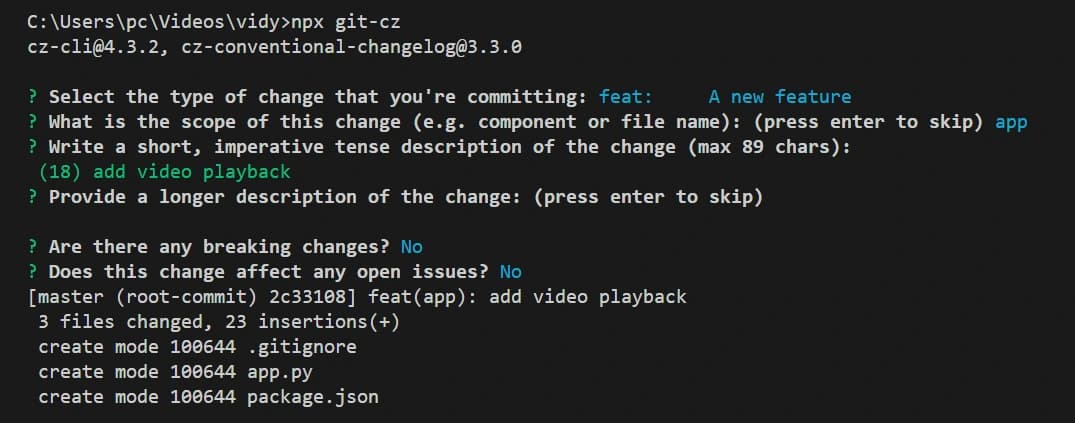
Type, scope, description, done. You physically cannot write a malformed commit.
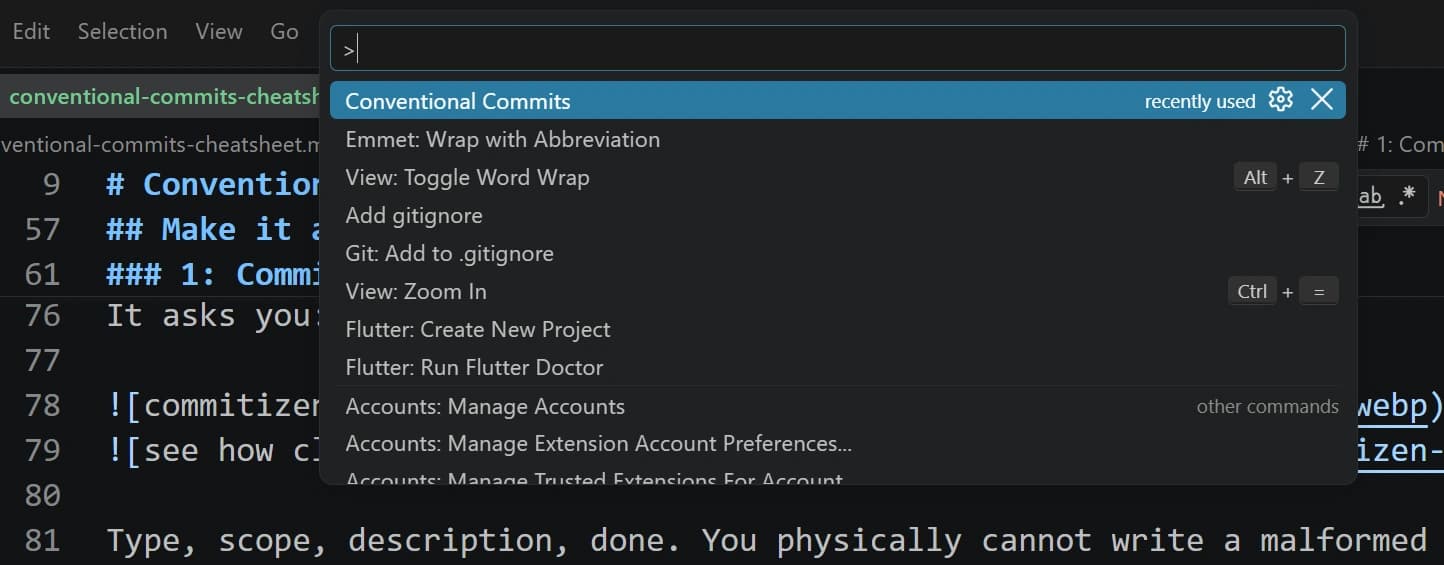
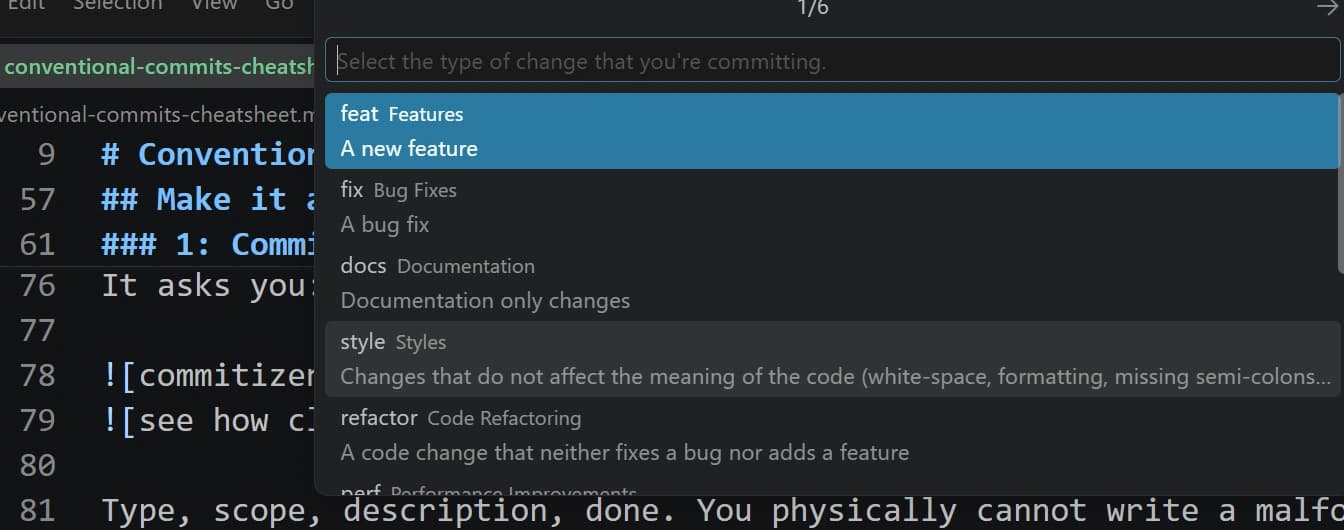
If you’re in VS Code and don’t want a CLI thing, Conventional Commits extension (by Vivaxy) gives you the same prompt from the control panel or command palette (Ctrl+Shift+P).
Pick type, write message, done.
2: A commit-msg hook
What if someone types git commit -m "oops" and skips conventional commits? Keep a hook in your repository.
I think husky is the best way to do this on Windows.
npm install -D @commitlint/cli @commitlint/config-conventional husky
npx husky init
Keep this in .husky/commit-msg:
npx --no -- commitlint --edit ${1}
Now a bad commit just fails:
$ git commit -m "fixed some things"
⧗   input: fixed some things
✖   subject must not be sentence-case, start-case, pascal-case, upper-case
✖   found 1 problems, 0 warnings
The hook is a good idea if you’re working with a team.
Examples from my passion project
I recently started an ad-free music site to help beginners get really good at guitar . It’s not a get good in 1 month promise, takes years, but it’s fully free, and it’s a handy reference I use daily. I’m not doing a pitch here haha.
Either way, it’s a custom site. The commit history is messy. I used conventional commits out of habit, and this is what it looks like:
docs(blog): scale positions, chord reference in cmaj scale
feat: homepage schema, organization, json-ld
fix: json-ld schema for faq
fix: rm youtube link, update meta, update site title for seo
feat+fix: a maj scale, ui/link fixes
fix: placeholder img for c, g, d
Let’s see what I’ve done so far.
# here's the command if you want to run this on some repo
git log --pretty=format:'%s' | grep -oE '^(feat|fix|docs|refactor|chore)' | sort | uniq -c | sort -rn
15 fix| 9 feat| 7 refactor| 4 docs|1 chore, and 5 didn’t fit any.
But, you may ask, “didn’t you just say I should stick to these words, how come you forgot to do that yourself!”.
Good question. That’s a mix of me being chaotic and something I’ll get into in a while.
Notice how most of my commits (42%) are fixes. Many of them are small changes - json-ld schema fixes, js bugs, removing fancy things to reduce LCP, fixing UI bugs. Hmm.. I’ve been fixing bugs more than shipping features, which is fine.
Mine is a reference + blog site, so docs is part of the project. I thought of blogs as feature early on, then later decided they were docs because I’m spending time building tools, so it’s kind of misleading, but it’s fine. I’m too lazy to go in and change them now.
There’s something conventional commits doesn’t cover. It assumes atomic commits. I stare at a screen and bang on my keys till I get something done. My commits aren’t always atomic. I do 5 different things before doing commits. Honestly,
- I could split the commit if I had time. Something like
git reset --soft HEAD~1, commit the feat, commit the fix. - I could pick the change that feels major, and keep the other in description.
feat: fancy new scale chartwithperfin description is fine.
I don’t have versioning set up at present, and I’m fine keeping feat+fix over deciding which I should keep. You should pick one and stick to one of the above if you have plans to run automations or if it’s for your portfolio or something.
If you want even less
7 types too many?
- Three types:
feat,fix,chore. Simple, works. - Skip scopes.
- Short descriptions only, skip body, footer, skip
BREAKING CHANGE.
feat: add search
fix: search crashes on empty input
chore: update deps
What this means for you?
So, do you need conventional commits? If you’re serious about keeping your history organized, probably. Writing clear messages is fine, and you don’t really have to write feat, fix or chore if your project would be better with something else. If it’s for your personal knowledgebase, it makes more sense to have verbs like journal, goals, habits, gratitude, and frankly, it’s entirely upto you.
For software, sticking to conventional commits is still a good idea. Learn the rules so you can break them!
Footnotes
- The official site has RFC-style rules. I think 7 is fine for most of what I do.
- The format comes from the Angular convention (2014 roughly), which is why
featandfixmap to SemVer minor/patch. Angular’s config addsbuild,ci,revert, and more - I mostly skip them. - You can customize
@commitlint/config-conventional; you can add types, ban scopes, enforce lengths. I’ve never needed to.